ggplot2, by Hadley Wickham, is an excellent and flexible package for elegant data visualization in R. However the default generated plots require some formatting before we can send them for publication. Furthermore, to customize a ggplot, the syntax is opaque and this raises the level of difficulty for researchers with no advanced R programming skills.
The ‘ggpubr’ package provides some easy-to-use functions for creating and customizing ‘ggplot2’-based publication ready plots.
Find out more at https://rpkgs.datanovia.com/ggpubr/.
Highlights in the development version
- Modern compatibility updates for current
ggplot2,dplyr, andtidyr. - New p-value formatting helpers:
format_p_value(),get_p_format_style(),list_p_format_styles(). - Extended p-value formatting parameters across statistical layers:
p.format.style,p.digits,p.leading.zero,p.min.threshold,p.decimal.mark. - Sparse grouped subsets are handled robustly in
stat_compare_means()andgeom_pwc(): non-comparable subsets are skipped while valid comparisons are kept (#663).
Installation and loading
- Install from CRAN as follows:
install.packages("ggpubr")- Or, install the latest version from GitHub as follows:
# Install
if(!require(devtools)) install.packages("devtools")
devtools::install_github("kassambara/ggpubr")
Distribution
library(ggpubr)
#> Le chargement a nécessité le package : ggplot2
# Create some data format
# :::::::::::::::::::::::::::::::::::::::::::::::::::
set.seed(1234)
wdata = data.frame(
   sex = factor(rep(c("F", "M"), each=200)),
   weight = c(rnorm(200, 55), rnorm(200, 58)))
head(wdata, 4)
#>   sex   weight
#> 1   F 53.79293
#> 2   F 55.27743
#> 3   F 56.08444
#> 4   F 52.65430

# Density plot with mean lines and marginal rug
# :::::::::::::::::::::::::::::::::::::::::::::::::::
# Change outline and fill colors by groups ("sex")
# Use custom palette
ggdensity(wdata, x = "weight",
   add = "mean", rug = TRUE,
   color = "sex", fill = "sex",
   palette = c("#00AFBB", "#E7B800"))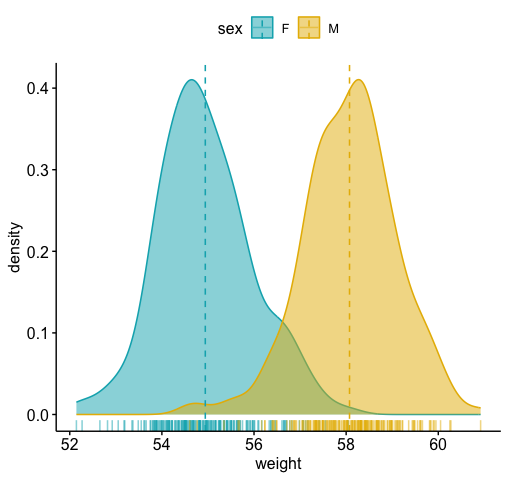
# Histogram plot with mean lines and marginal rug
# :::::::::::::::::::::::::::::::::::::::::::::::::::
# Change outline and fill colors by groups ("sex")
# Use custom color palette
gghistogram(wdata, x = "weight",
   add = "mean", rug = TRUE,
   color = "sex", fill = "sex",
   palette = c("#00AFBB", "#E7B800"))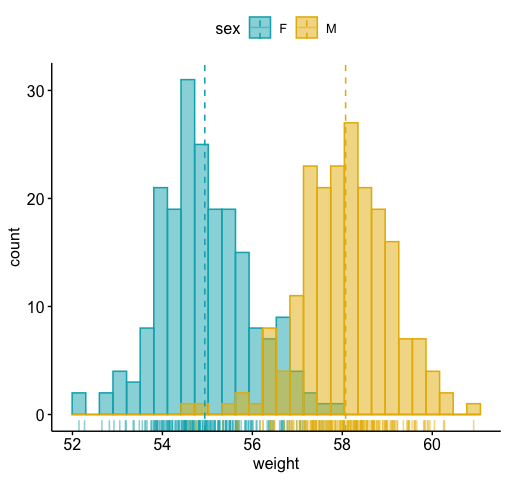
Box plots and violin plots
# Load data
data("ToothGrowth")
df <- ToothGrowth
head(df, 4)
#>    len supp dose
#> 1  4.2   VC  0.5
#> 2 11.5   VC  0.5
#> 3  7.3   VC  0.5
#> 4  5.8   VC  0.5

# Box plots with jittered points
# :::::::::::::::::::::::::::::::::::::::::::::::::::
# Change outline colors by groups: dose
# Use custom color palette
# Add jitter points and change the shape by groups
 p <- ggboxplot(df, x = "dose", y = "len",
                color = "dose", palette =c("#00AFBB", "#E7B800", "#FC4E07"),
                add = "jitter", shape = "dose")
 p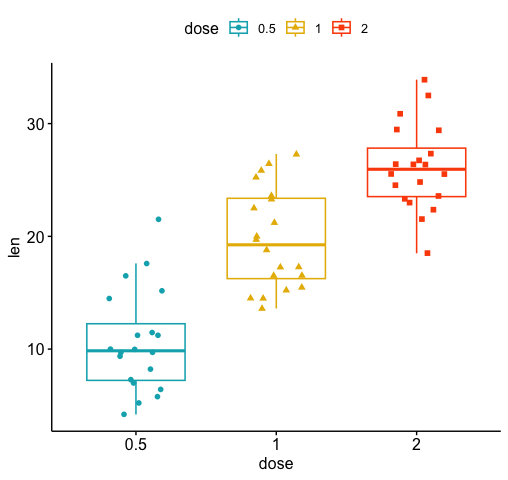
 # Add p-values comparing groups
 # Specify the comparisons you want
my_comparisons <- list( c("0.5", "1"), c("1", "2"), c("0.5", "2") )
p + stat_compare_means(comparisons = my_comparisons)+ # Add pairwise comparisons p-value
  stat_compare_means(label.y = 50)                   # Add global p-value
#> `stat_compare_means()` with `comparisons` displays *unadjusted* p-values (no correction for multiple comparisons).
#> ℹ For p-values adjusted for multiple comparisons, use `geom_pwc()`, or `stat_pvalue_manual()` together with `compare_means(..., p.adjust.method = )`.
#> This message is displayed once per session.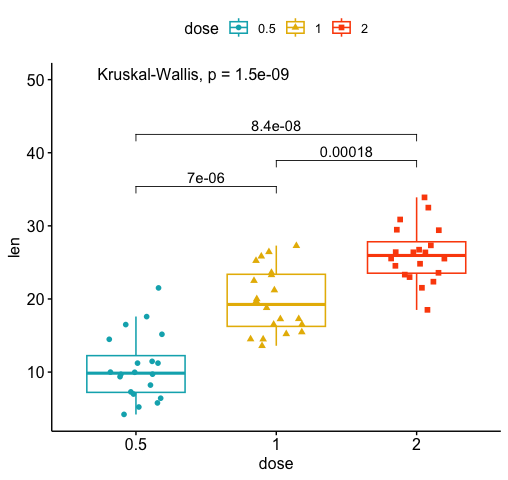
# Violin plots with box plots inside
# :::::::::::::::::::::::::::::::::::::::::::::::::::
# Change fill color by groups: dose
# add boxplot with white fill color
ggviolin(df, x = "dose", y = "len", fill = "dose",
         palette = c("#00AFBB", "#E7B800", "#FC4E07"),
         add = "boxplot", add.params = list(fill = "white"))+
  stat_compare_means(comparisons = my_comparisons, label = "p.signif")+ # Add significance levels
  stat_compare_means(label.y = 50)                                      # Add global the p-value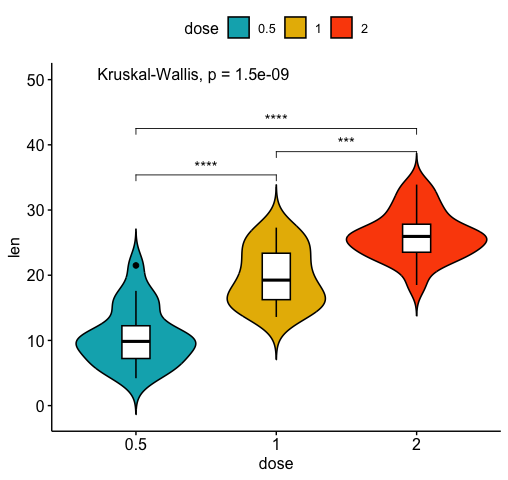
Bar plots
Demo data set
Load and prepare data:
# Load data
data("mtcars")
dfm <- mtcars
# Convert the cyl variable to a factor
dfm$cyl <- as.factor(dfm$cyl)
# Add the name colums
dfm$name <- rownames(dfm)
# Inspect the data
head(dfm[, c("name", "wt", "mpg", "cyl")])
#>                                name    wt  mpg cyl
#> Mazda RX4                 Mazda RX4 2.620 21.0   6
#> Mazda RX4 Wag         Mazda RX4 Wag 2.875 21.0   6
#> Datsun 710               Datsun 710 2.320 22.8   4
#> Hornet 4 Drive       Hornet 4 Drive 3.215 21.4   6
#> Hornet Sportabout Hornet Sportabout 3.440 18.7   8
#> Valiant                     Valiant 3.460 18.1   6
Ordered bar plots
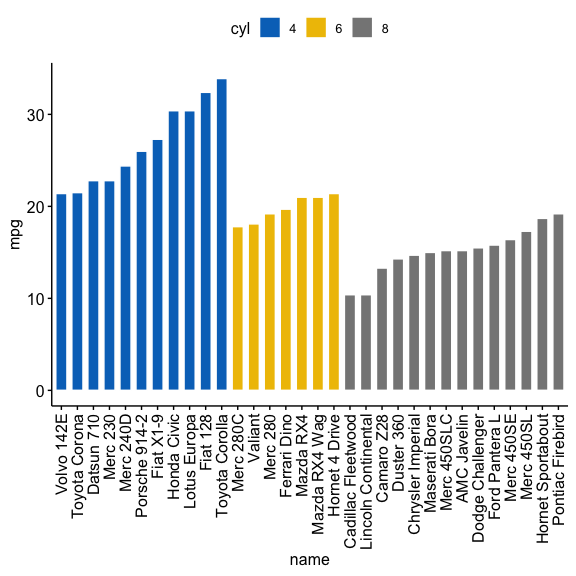
Change the fill color by the grouping variable “cyl”. Sorting will be done globally, but not by groups.
ggbarplot(dfm, x = "name", y = "mpg",
          fill = "cyl",               # change fill color by cyl
          color = "white",            # Set bar border colors to white
          palette = "jco",            # jco journal color palette. see ?ggpar
          sort.val = "desc",          # Sort the value in descending order
          sort.by.groups = FALSE,     # Don't sort inside each group
          x.text.angle = 90           # Rotate vertically x axis texts
          )
Sort bars inside each group. Use the argument sort.by.groups = TRUE.
ggbarplot(dfm, x = "name", y = "mpg",
          fill = "cyl",               # change fill color by cyl
          color = "white",            # Set bar border colors to white
          palette = "jco",            # jco journal color palette. see ?ggpar
          sort.val = "asc",           # Sort the value in ascending order
          sort.by.groups = TRUE,      # Sort inside each group
          x.text.angle = 90           # Rotate vertically x axis texts
          )
Deviation graphs
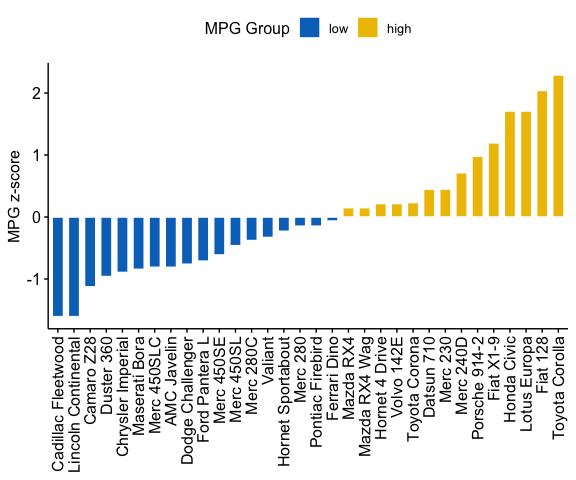
The deviation graph shows the deviation of quantitative values to a reference value. In the R code below, we’ll plot the mpg z-score from the mtcars dataset.
Calculate the z-score of the mpg data:
# Calculate the z-score of the mpg data
dfm$mpg_z <- (dfm$mpg -mean(dfm$mpg))/sd(dfm$mpg)
dfm$mpg_grp <- factor(ifelse(dfm$mpg_z < 0, "low", "high"),
                     levels = c("low", "high"))
# Inspect the data
head(dfm[, c("name", "wt", "mpg", "mpg_z", "mpg_grp", "cyl")])
#>                                name    wt  mpg      mpg_z mpg_grp cyl
#> Mazda RX4                 Mazda RX4 2.620 21.0  0.1508848    high   6
#> Mazda RX4 Wag         Mazda RX4 Wag 2.875 21.0  0.1508848    high   6
#> Datsun 710               Datsun 710 2.320 22.8  0.4495434    high   4
#> Hornet 4 Drive       Hornet 4 Drive 3.215 21.4  0.2172534    high   6
#> Hornet Sportabout Hornet Sportabout 3.440 18.7 -0.2307345     low   8
#> Valiant                     Valiant 3.460 18.1 -0.3302874     low   6
Create an ordered barplot, colored according to the level of mpg:
ggbarplot(dfm, x = "name", y = "mpg_z",
          fill = "mpg_grp",           # change fill color by mpg_level
          color = "white",            # Set bar border colors to white
          palette = "jco",            # jco journal color palette. see ?ggpar
          sort.val = "asc",           # Sort the value in ascending order
          sort.by.groups = FALSE,     # Don't sort inside each group
          x.text.angle = 90,          # Rotate vertically x axis texts
          ylab = "MPG z-score",
          xlab = FALSE,
          legend.title = "MPG Group"
          )
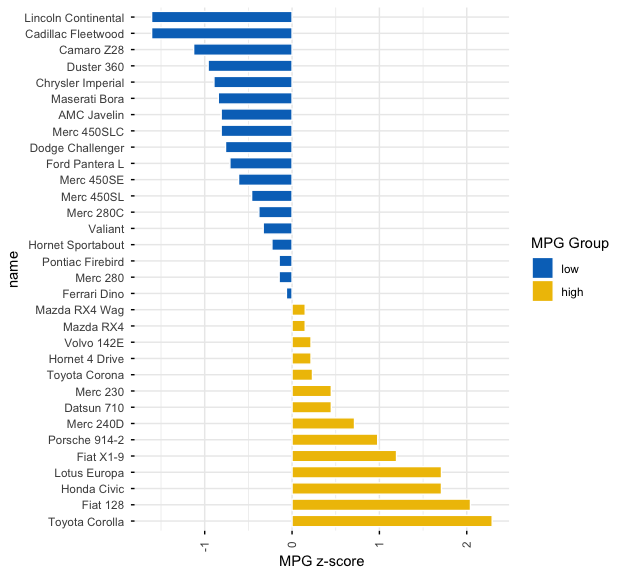
Rotate the plot: use rotate = TRUE and sort.val = “desc”
ggbarplot(dfm, x = "name", y = "mpg_z",
          fill = "mpg_grp",           # change fill color by mpg_level
          color = "white",            # Set bar border colors to white
          palette = "jco",            # jco journal color palette. see ?ggpar
          sort.val = "desc",          # Sort the value in descending order
          sort.by.groups = FALSE,     # Don't sort inside each group
          x.text.angle = 90,          # Rotate vertically x axis texts
          ylab = "MPG z-score",
          legend.title = "MPG Group",
          rotate = TRUE,
          ggtheme = theme_minimal()
          )
Dot charts
Lollipop chart
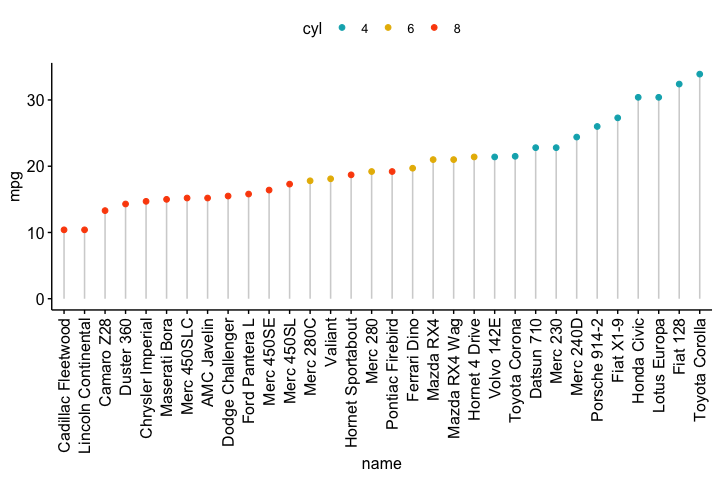
Lollipop chart is an alternative to bar plots, when you have a large set of values to visualize.
Lollipop chart colored by the grouping variable “cyl”:
ggdotchart(dfm, x = "name", y = "mpg",
           color = "cyl",                                # Color by groups
           palette = c("#00AFBB", "#E7B800", "#FC4E07"), # Custom color palette
           sorting = "ascending",                        # Sort value in descending order
           add = "segments",                             # Add segments from y = 0 to dots
           ggtheme = theme_pubr()                        # ggplot2 theme
           )
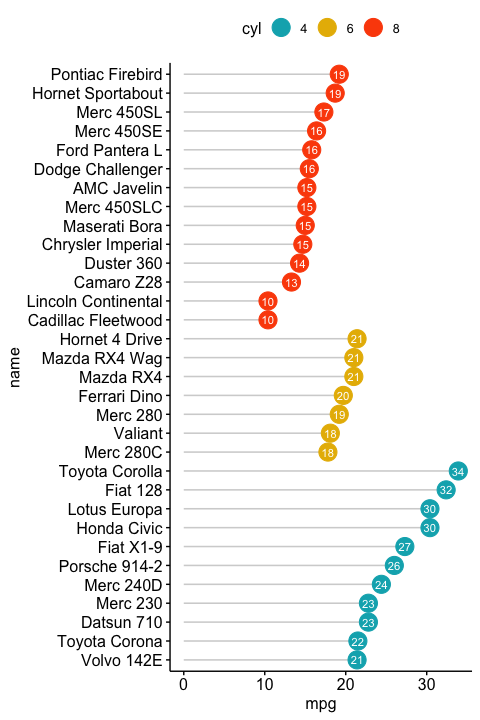
- Sort in descending order. sorting = “descending”.
- Rotate the plot vertically, using rotate = TRUE.
- Sort the mpg value inside each group by using group = “cyl”.
- Set dot.size to 6.
- Add mpg values as label. label = “mpg” or label = round(dfm$mpg).
ggdotchart(dfm, x = "name", y = "mpg",
           color = "cyl",                                # Color by groups
           palette = c("#00AFBB", "#E7B800", "#FC4E07"), # Custom color palette
           sorting = "descending",                       # Sort value in descending order
           add = "segments",                             # Add segments from y = 0 to dots
           rotate = TRUE,                                # Rotate vertically
           group = "cyl",                                # Order by groups
           dot.size = 6,                                 # Large dot size
           label = round(dfm$mpg),                        # Add mpg values as dot labels
           font.label = list(color = "white", size = 9,
                             vjust = 0.5),               # Adjust label parameters
           ggtheme = theme_pubr()                        # ggplot2 theme
           )
Deviation graph:
- Use y = “mpg_z”
- Change segment color and size: add.params = list(color = “lightgray”, size = 2)
ggdotchart(dfm, x = "name", y = "mpg_z",
           color = "cyl",                                # Color by groups
           palette = c("#00AFBB", "#E7B800", "#FC4E07"), # Custom color palette
           sorting = "descending",                       # Sort value in descending order
           add = "segments",                             # Add segments from y = 0 to dots
           add.params = list(color = "lightgray", size = 2), # Change segment color and size
           group = "cyl",                                # Order by groups
           dot.size = 6,                                 # Large dot size
           label = round(dfm$mpg_z,1),                        # Add mpg values as dot labels
           font.label = list(color = "white", size = 9,
                             vjust = 0.5),               # Adjust label parameters
           ggtheme = theme_pubr()                        # ggplot2 theme
           )+
  geom_hline(yintercept = 0, linetype = 2, color = "lightgray")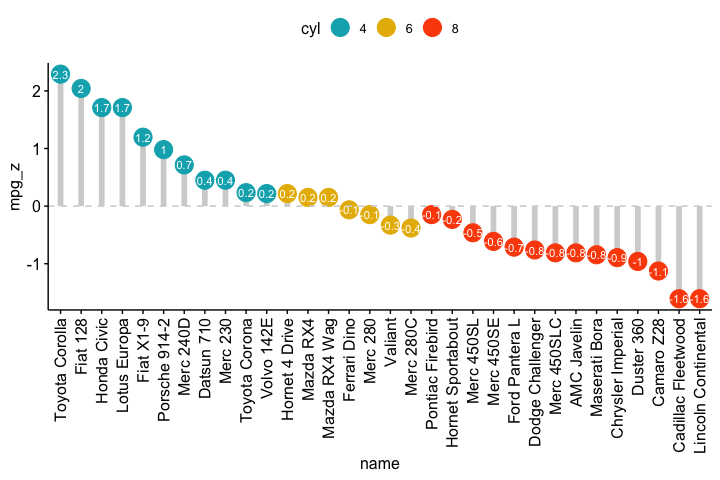
Cleveland’s dot plot
Color y text by groups. Use y.text.col = TRUE.
ggdotchart(dfm, x = "name", y = "mpg",
           color = "cyl",                                # Color by groups
           palette = c("#00AFBB", "#E7B800", "#FC4E07"), # Custom color palette
           sorting = "descending",                       # Sort value in descending order
           rotate = TRUE,                                # Rotate vertically
           dot.size = 2,                                 # Large dot size
           y.text.col = TRUE,                            # Color y text by groups
           ggtheme = theme_pubr()                        # ggplot2 theme
           )+
  theme_cleveland()                                      # Add dashed grids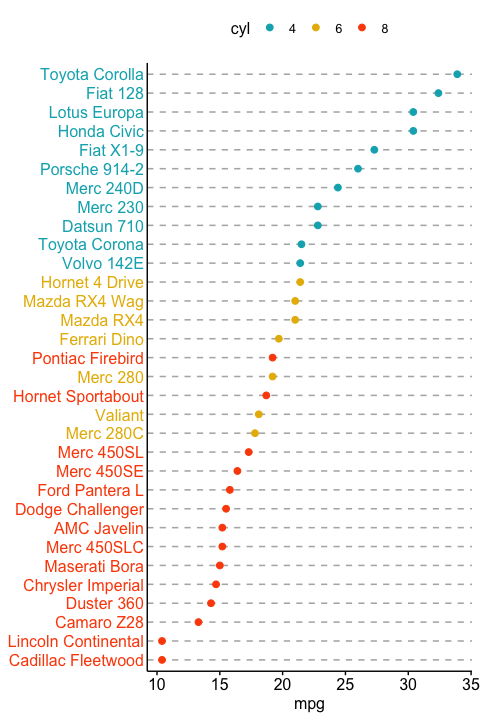
More
Find out more at https://rpkgs.datanovia.com/ggpubr/.
Blog posts
- A. Kassambara. ggpubr R Package: ggplot2-Based Publication Ready Plots