Build a factoextra-ready object from pre-computed coordinates
Source:R/as_factoextra.R
as_factoextra.Rdas_factoextra_pca() wraps pre-computed individual (and, optionally,
variable) coordinates into an object that the fviz_pca family
(fviz_pca_ind(), fviz_pca_var(), fviz_pca_biplot()),
fviz_eig, fviz_contrib and fviz_cos2
can plot directly. Read more:
Principal Component Analysis (PCA) in R: Compute, Visualize & Interpret.
It lets you apply factoextra's visualizations to the output of an
eigenvalue-based dimension reduction - for example
stats::cmdscale(), ape::pcoa(), vegan::rda()/cca(),
a tidymodels recipe/workflow with step_pca() (see the
methods below), or a custom analysis - without having to write a dedicated
backend. You bring the coordinates; factoextra draws the biplot, scree plot,
contributions and cos2.
The scree plot, contributions and cos2 assume real eigenvalues, so this constructor is for PCA-family results. Non-linear embeddings (UMAP, t-SNE) have no eigenvalues; plot their coordinates directly (a scree/loadings display would be meaningless for them).
Usage
as_factoextra_pca(ind.coord, ...)

# Default S3 method
as_factoextra_pca(
  ind.coord,
  var.coord = NULL,
  eig = NULL,
  ind.cos2 = NULL,
  ind.contrib = NULL,
  var.cos2 = NULL,
  var.contrib = NULL,
  var.cor = NULL,
  scale.unit = FALSE,
  ...
)

# S3 method for class 'recipe'
as_factoextra_pca(ind.coord, ...)

# S3 method for class 'workflow'
as_factoextra_pca(ind.coord, ...)
Arguments
- ind.coord
the object to convert. For the default method, individual (observation) coordinates: a numeric matrix or data frame with one column per dimension (the "scores"). For the
recipe/workflowmethods, a preppedrecipeor a fittedworkflowwhose PCA is done withrecipes::step_pca()(the scores, loadings and eigenvalues are then extracted for you). Required.- ...
passed to methods (unused by the default method).
- var.coord
optional variable coordinates / loadings: a numeric matrix or data frame with one column per dimension. Supplying it enables
fviz_pca_var()andfviz_pca_biplot().- eig
optional numeric vector of eigenvalues (length \(\ge\) number of dimensions). Used by the scree plot and to label the axes with the percentage of explained variance. When
NULL(default) it is set to the variance of each coordinate column (the natural definition of a PCA eigenvalue).- ind.cos2, ind.contrib, var.cos2, var.contrib, var.cor
optional pre-computed quality (
cos2), contribution and (variable) correlation matrices, with the same dimensions as the corresponding coordinates. When omitted they are derived from the coordinates (see Details).- scale.unit
logical. If
TRUE, the variable coordinates are treated as correlations and the correlation circle is drawn byfviz_pca_var(). Default isFALSE.
Value
An object of class c("factoextra_pca", "list") holding the
standardized ind (and var) results and eigenvalues, ready for
the fviz_pca_*() functions.
Details
When cos2/contrib are not supplied they are computed from the
coordinates:
contrib = 100 * coord^2 / colSums(coord^2)- the exact contribution of each element to each dimension.cos2 = coord^2 / rowSums(coord^2)- the quality of representation within the supplied dimensions. This equals the true cos2 only when all components are provided; with a truncated set of dimensions it is the quality restricted to that sub-space. Passind.cos2/var.cos2explicitly if you have the exact values.
tidymodels (recipe / workflow). The recipe and workflow
methods extract a PCA fitted with recipes::step_pca() through the public
recipes/workflows API: the scores from the baked training data (or, for a fitted
workflow, workflows::extract_mold()), the loadings from
tidy(step, type = "coef"), and the full set of eigenvalues from
tidy(step, type = "variance") (so the scree plot and axis percentages are
honest even when num_comp keeps only a few components). Variable
coordinates are loading times the square root of the eigenvalue. Exact
variable-component correlations and cos2 are recovered from the full PCA
inertia when every PCA input is provably centered. When those metrics cannot
be recovered (for example, for a bare step_pca() with no centering or a
zero-inertia variable), their entries in get_pca_var() are NULL.
Scores, eigenvalues, variable coordinates and contributions are still returned,
so the individual, scree, variable-arrow and biplot displays remain available;
correlation/cos2-dependent displays fail with an explicit unavailable-metric
error. The correlation circle is omitted and a warning explains how to recover
the metrics. scale.unit is set to TRUE only when every
PCA input is both centered and unit-scaled at the PCA boundary; partial scaling
therefore does not draw a correlation circle. For fully normalized data,
variable coordinates, correlations, cos2 and contributions, and the eigenvalue
percentages match a full FactoMineR::PCA() regardless of how many
components step_pca() keeps; the individual cos2 is computed over
the retained components (it equals the full-space cos2 only when all components
are kept). The two-dimensional plots (fviz_pca_ind(),
fviz_pca_var(), fviz_pca_biplot()) need num_comp >= 2. The
recipe must be prepped, and its single PCA step must be an unweighted
step_pca() and must be the final recipe step. Case-weighted PCA is
rejected because the adapter cannot yet propagate those weights into individual
contributions. Later steps could transform the baked/mold PCA
scores without updating the fitted PCA loadings or eigenvalues, so such recipes
fail explicitly instead of returning internally inconsistent geometry.
Non-linear embedding steps such as step_umap() have no eigenvalues and
are rejected with a message. For the loadings display of a recipe PCA see also
learntidymodels::plot_top_loadings().
See also
For UMAP / t-SNE embeddings, which have no eigenvalues, use
fviz_umap / fviz_tsne instead.
Online tutorial: Principal Component Analysis (PCA) in R: Compute, Visualize & Interpret.
Author
Alboukadel Kassambara alboukadel.kassambara@gmail.com
Examples
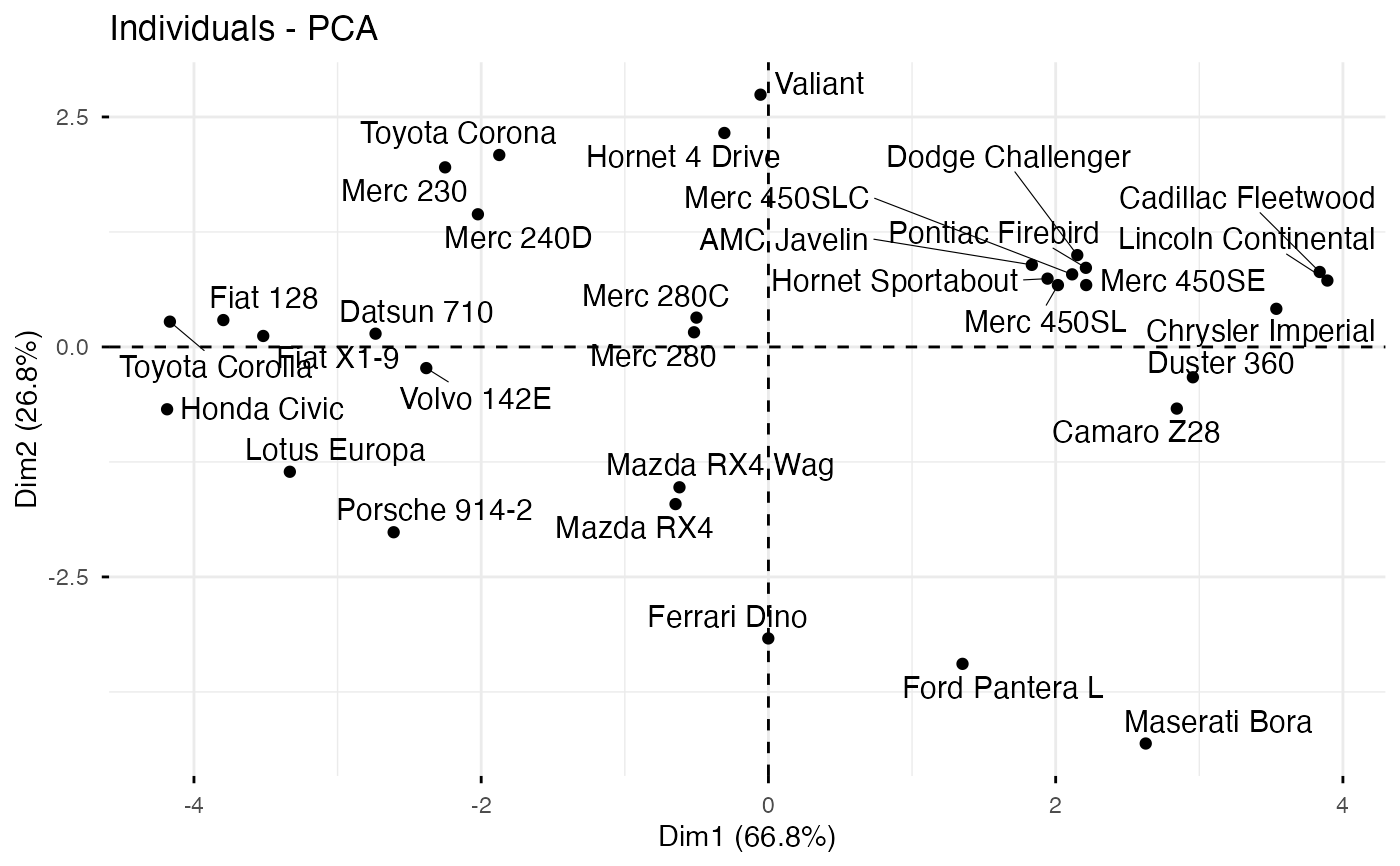
# 1. Bring your own coordinates: classical MDS (cmdscale) -> factoextra
d <- dist(scale(mtcars))
mds <- cmdscale(d, k = 3)
obj <- as_factoextra_pca(ind.coord = mds)
fviz_pca_ind(obj, repel = TRUE)
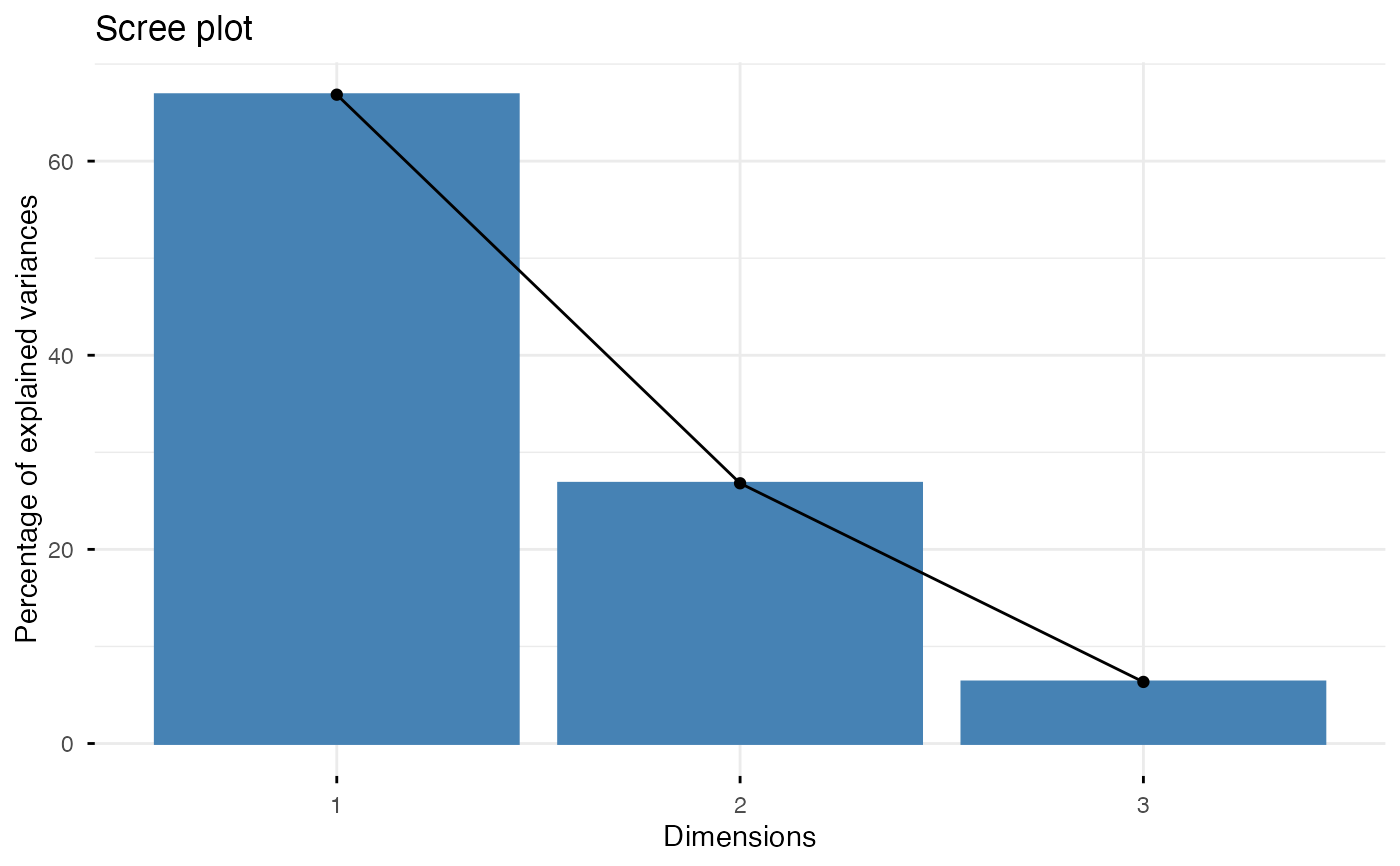
 fviz_eig(obj)
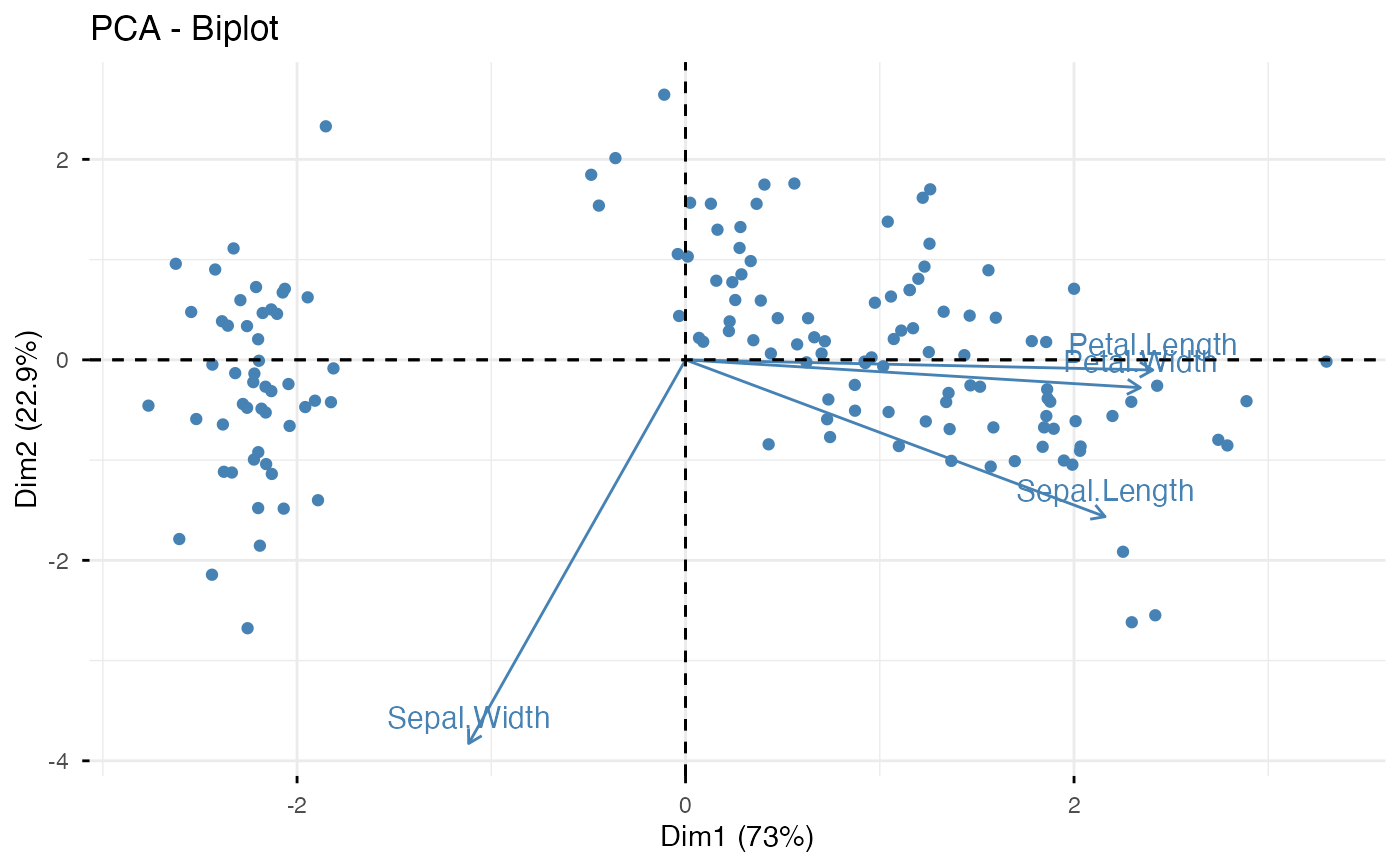
 # 2. Round-trip a prcomp result through the constructor (biplot)
pca <- prcomp(iris[, -5], scale. = TRUE)
obj2 <- as_factoextra_pca(
ind.coord = pca$x,
var.coord = sweep(pca$rotation, 2, pca$sdev, "*"),
eig = pca$sdev^2,
scale.unit = TRUE
)
fviz_pca_biplot(obj2, label = "var", col.ind = "steelblue")
# 2. Round-trip a prcomp result through the constructor (biplot)
pca <- prcomp(iris[, -5], scale. = TRUE)
obj2 <- as_factoextra_pca(
ind.coord = pca$x,
var.coord = sweep(pca$rotation, 2, pca$sdev, "*"),
eig = pca$sdev^2,
scale.unit = TRUE
)
fviz_pca_biplot(obj2, label = "var", col.ind = "steelblue")
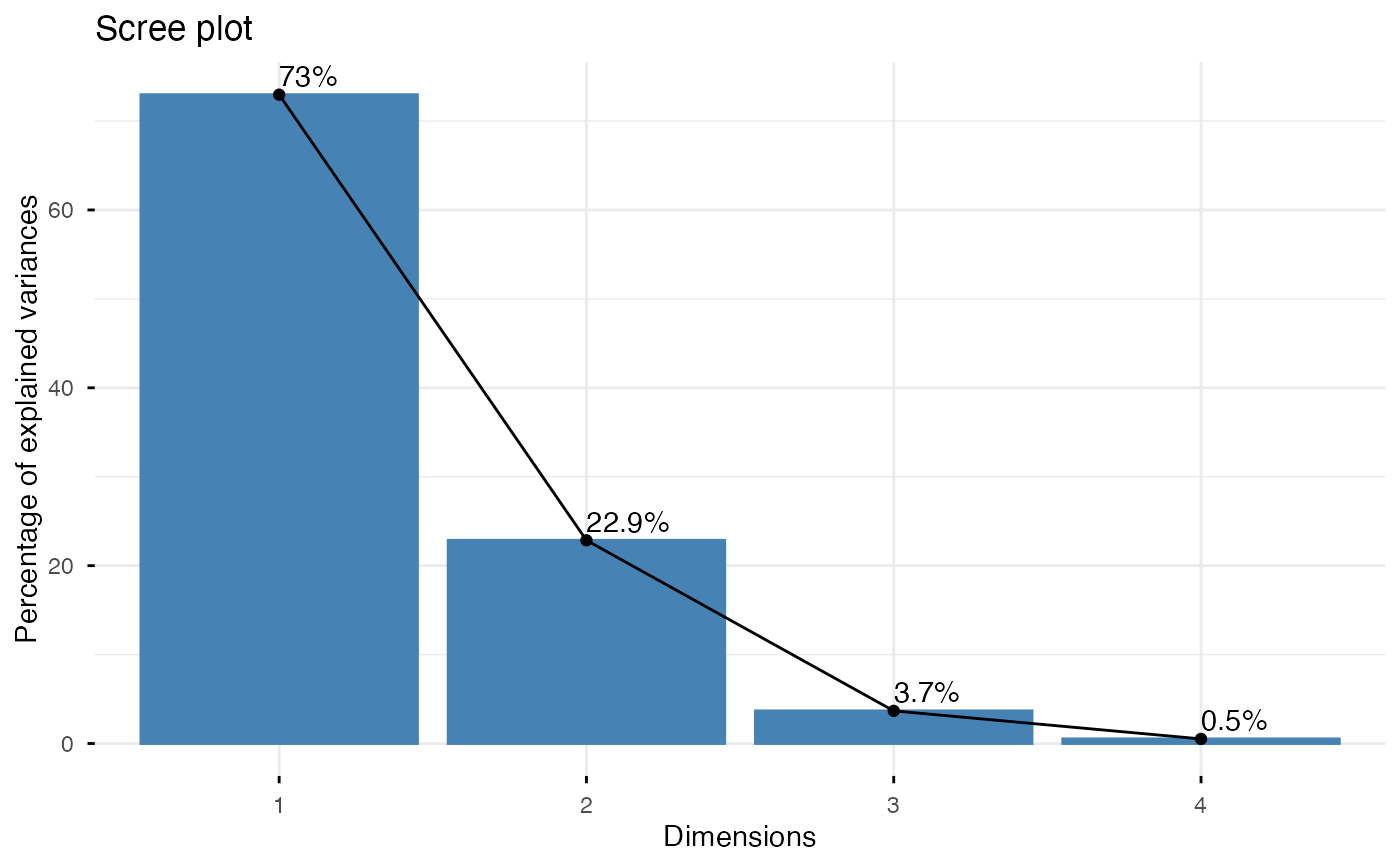
 # 3. A tidymodels recipe PCA (step_pca) -> factoextra biplot + honest scree
if (requireNamespace("recipes", quietly = TRUE)) {
library(recipes)
rec <- recipe(~ ., data = iris[, 1:4]) |>
step_normalize(all_numeric_predictors()) |>
step_pca(all_numeric_predictors(), num_comp = 4)
obj3 <- as_factoextra_pca(prep(rec))
fviz_pca_biplot(obj3, label = "var")
fviz_eig(obj3, addlabels = TRUE)
}
#> Loading required package: dplyr
#>
#> Attaching package: ‘dplyr’
#> The following objects are masked from ‘package:stats’:
#>
#> filter, lag
#> The following objects are masked from ‘package:base’:
#>
#> intersect, setdiff, setequal, union
#>
#> Attaching package: ‘recipes’
#> The following object is masked from ‘package:stats’:
#>
#> step
# 3. A tidymodels recipe PCA (step_pca) -> factoextra biplot + honest scree
if (requireNamespace("recipes", quietly = TRUE)) {
library(recipes)
rec <- recipe(~ ., data = iris[, 1:4]) |>
step_normalize(all_numeric_predictors()) |>
step_pca(all_numeric_predictors(), num_comp = 4)
obj3 <- as_factoextra_pca(prep(rec))
fviz_pca_biplot(obj3, label = "var")
fviz_eig(obj3, addlabels = TRUE)
}
#> Loading required package: dplyr
#>
#> Attaching package: ‘dplyr’
#> The following objects are masked from ‘package:stats’:
#>
#> filter, lag
#> The following objects are masked from ‘package:base’:
#>
#> intersect, setdiff, setequal, union
#>
#> Attaching package: ‘recipes’
#> The following object is masked from ‘package:stats’:
#>
#> step